Project
yomye.me
Technical architecture of Yömye, covering its event-driven services, AI-assisted classification, social and listing features, authentication, media pipelines, private messaging, notifications, observability, infrastructure, and deployment environments.
Yömye Service Architecture
Yömye is available at yomye.me.
Yömye is designed as a social media platform for local businesses and people who provide everyday services, such as barbers, car washers, restaurants, mechanics, cafés, and many others. They can create a profile, share their work, publish posts, display their location and availability, and communicate directly with people.
People can use Yömye to discover and understand a place or service before visiting it. Someone planning to get a haircut, for example, can inspect a barber’s profile, see previous work, check the location and availability, and start a conversation.
Yömye can also help people publish listings when they need something. A person can describe a need in their own words, such as “I need a mathematics teacher for my child.” Yömye can interpret the request, organize it under the relevant category, and help suitable service providers discover and respond to it.
In this way, Yömye can bring social presence, local discovery, listings, and direct communication into one platform.
Contents
- Yömye Service Architecture
Overall Architecture
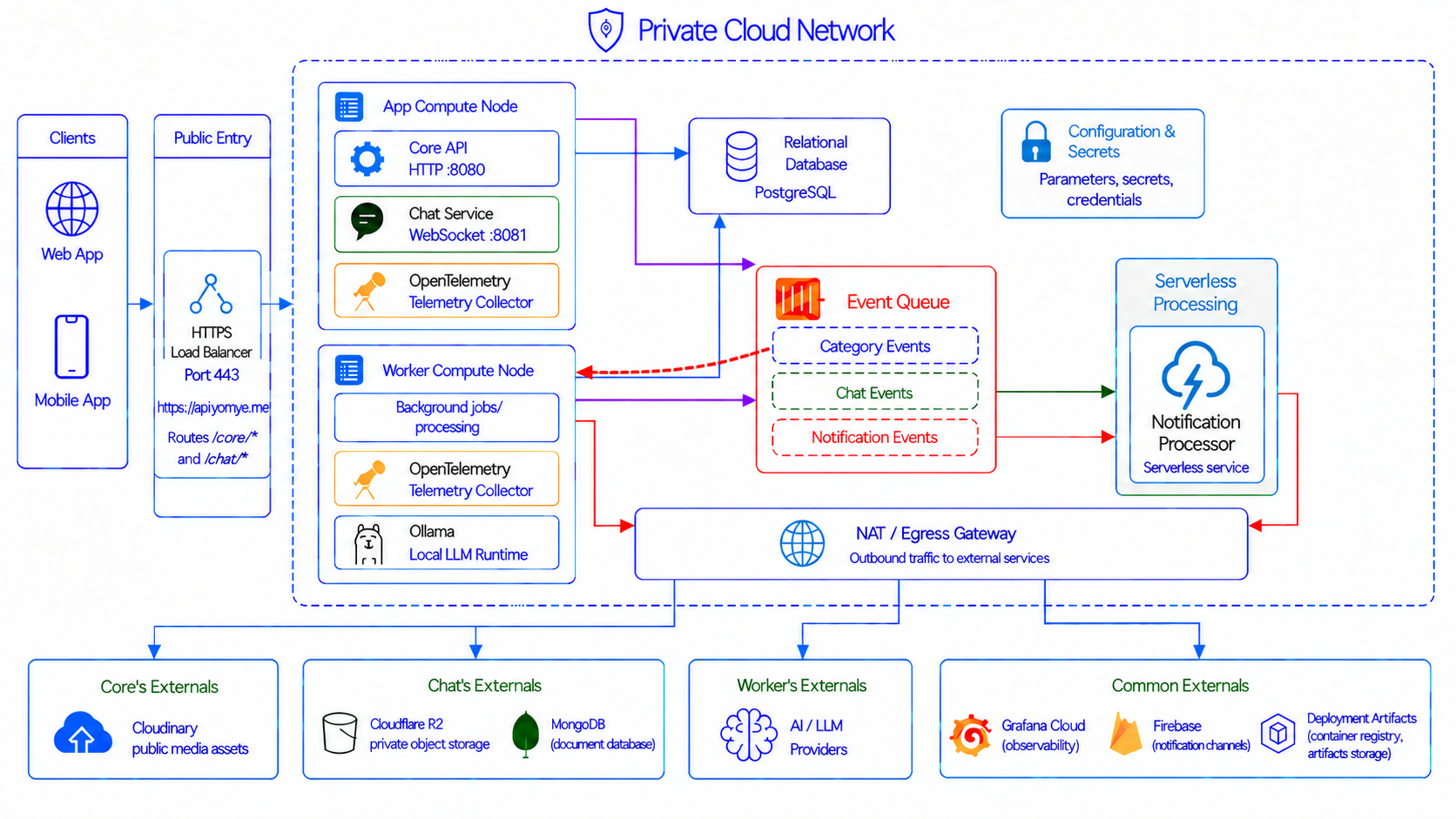
The image shows the production request and event paths. Web and mobile clients enter through one public HTTPS endpoint. Core and Chat receive synchronous requests, while Worker and Notification consume asynchronous events. The application nodes and PostgreSQL have private addresses. Outbound calls to Cloudinary, R2, MongoDB, AI providers, Grafana Cloud, and Firebase leave through controlled egress. Configuration, secrets, application data, private chat data, and deployment artifacts are kept in stores designed for their different security and lifecycle needs.
Each backend service has a clear job:
- Worker does AI work in the background. It checks profession and listing text, asks AI services for category paths and listing details, and creates embeddings with local Ollama. It then matches the result with the shared category tree in PostgreSQL.
- Core is the main API. It checks user identity and manages profiles, places, listings, professions, public media data, settings, saved notifications, and the outbox. It handles HTTP requests on port
8080. It also sends events when important data changes. - Notification runs without a permanent server process. It receives events, finds the correct handler, builds a notification for each user, saves it in the inbox, and tries to send a Firebase push message. Safe retries prevent duplicate notifications.
- Chat manages private communication in real time. It handles WebSocket and HTTP traffic on port
8081. It stores conversations and messages in MongoDB. Private files are stored in Cloudflare R2 and use short-lived upload and download links.
Core and Chat are separate programs on one permanent production VM. Worker has its own permanent VM and local Ollama service. Notification has two entry points. AWS uses Lambda and SQS. GCP production uses an authenticated Pub/Sub push request and Cloud Run. Both entry points use the same notification logic.
Service boundaries and event flow
Yömye is decoupled at the application level even though some services currently share compute to reduce cost. Each service has one clear responsibility, its own executable, repository, configuration, deployment workflow, cloud identity, health checks, and failure boundary.
The synchronous paths are intentionally short. A client calls Core for application data and Chat for conversations. Core reaches PostgreSQL for relational data. Chat reaches MongoDB for messages and R2 for private attachments. A slow AI provider cannot make a listing-submission request wait because AI processing belongs to Worker and starts from an event.
The asynchronous paths use small event contracts:
- Core commits a listing or profession change and its outbox record in one PostgreSQL transaction.
- The outbox publisher sends the category event to Pub/Sub.
- Worker consumes the event, performs moderation, classification, extraction, localization, and embedding work, and saves the result.
- Worker publishes a notification event when users must be informed about the result.
- Chat publishes a
new_messageevent when an offline recipient needs a notification. - Notification receives Worker or Chat events, selects the registered renderer, saves the inbox row, and sends the Firebase push.
This design prevents a direct chain such as Client → Core → Worker → AI provider → Notification. Producers do not need to know where consumers run, and consumers can retry independently. Durable identifiers and database uniqueness rules make redelivery safe. A Notification or AI-provider outage therefore does not need to roll back a message or listing already accepted by its owning service.
The storage boundaries also reduce coupling. PostgreSQL holds shared relational facts, MongoDB holds private conversation documents, Cloudinary holds public media, and R2 holds private chat objects. Other services exchange stable IDs instead of copying complete records into every event. This keeps events small and lets the owning service remain authoritative.
Private networking and controlled egress
The production Compute Engine VMs do not have public IP addresses. Cloud SQL also has no public database address and is reached through private service networking. Private Google access lets workloads reach supported Google APIs without making the VMs public.
Cloud NAT is attached to the private subnet through a Cloud Router. It translates outbound connections from all subnet IP ranges to one reserved static public IP. Core, Chat, and Worker use this path when they call external services such as Cloudinary, R2, MongoDB, AI providers, or Grafana Cloud. The stable address can also be allowlisted by an external provider.
The NAT box in the image represents controlled egress at a high level. In the current GCP configuration, the private Compute Engine VMs use Cloud NAT. Notification connects to private addresses through its Cloud Run VPC interface, but PRIVATE_RANGES_ONLY routing lets its public calls, such as Firebase calls, use Cloud Run’s managed public egress instead of the reserved VM NAT address.
Cloud NAT is not an inbound gateway. It does not accept user requests and it does not expose a VM port. New inbound traffic can enter the application nodes only from two controlled sources:
- Google load-balancer and health-check ranges may reach the Core and Chat application ports.
- Google’s IAP range may reach SSH port
22for authenticated administration and deployment.
This means the public internet cannot connect directly to ports 8080, 8081, or 22. Return packets for an outbound NAT connection are allowed, but an outside host cannot start a new connection through the NAT address.
Public HTTPS load balancing
The production entry point is a Google Cloud global external Application Load Balancer, the GCP counterpart of an AWS Application Load Balancer. It reserves one global address and serves https://api.yomye.me on port 443 with a Google-managed TLS certificate. Port 80 exists only to return a permanent redirect to HTTPS.
AWS staging follows the same public-entry idea with an AWS Application Load Balancer. The providers use different resource names, but both give clients one HTTPS endpoint, check backend health, and route application paths without exposing the service VM directly.
Routing happens by path on the same hostname:
/coreand/core/*go to the Core backend on port8080./chatand/chat/*go to the Chat backend on port8081; the load balancer removes the/chatprefix before forwarding it.- Dedicated readiness and health paths let the load balancer stop routing to an unhealthy service.
Core and Chat currently run on the same VM, but they are registered as two backend services with different named ports and health checks. This is an important separation: the public contract does not depend on both programs sharing a machine. Either backend can later point to its own autoscaled service without changing the client hostname or URL structure. TLS ends at the load balancer; traffic from the load balancer to the private VM currently uses HTTP inside the controlled VPC path.
Why the current production layout is cost-optimized
The current topology is deliberately optimized for an early product with low traffic. It is not the desired high-availability architecture.
- Core and Chat share one persistent VM, which removes the cost of a second application VM but gives them the same host failure and capacity boundary.
- Worker uses one persistent VM because local Ollama needs a long-running runtime and model storage. It has no second worker node.
- Each load-balancer backend currently contains one VM, so the load balancer provides TLS, routing, and health checking but cannot fail over to another application instance.
- Cloud SQL is zonal rather than regional. Backups and point-in-time recovery protect data, but they do not provide immediate failover during a zone failure.
- Chat currently reaches its remote MongoDB service through public egress. This avoids running another database in the production VPC, but it adds network distance and NAT-path latency compared with a private database in the same region.
- Notification uses Cloud Run and can scale to zero, avoiding the cost of an idle notification server.
- Managed Pub/Sub, Cloud NAT, Secret Manager, Parameter Manager, Cloudinary, R2, and MongoDB avoid operating extra stateful infrastructure.
This compromise keeps the service contracts, security boundaries, and deployment boundaries correct while using the minimum practical amount of always-running compute. Logical decoupling is already present; physical redundancy is postponed until traffic and reliability needs justify its cost.
Desired architecture at larger scale
The target architecture would keep the same public APIs and event contracts but replace each single-node boundary with an independently scalable and highly available runtime:
- Core would run as multiple stateless instances in a regional managed instance group, GKE deployment, or Cloud Run service. Its backend would autoscale from request load and span at least two zones.
- Chat would have its own multi-zone deployment. WebSocket connections would be distributed across Chat instances, while shared presence and connection coordination would use a managed Redis-compatible store or another dedicated real-time coordination layer. Clients would reconnect safely when an instance disappears.
- Worker would become an autoscaled consumer pool. Queue depth would control capacity. Local-model work could run on a separate CPU/GPU node pool, while external-provider work could run on ordinary workers. Message leases, retry policies, and dead-letter topics would isolate poison events.
- Notification would remain a separate Cloud Run service, but production concurrency, minimum instances, maximum instances, retry policy, and dead-letter handling would be sized from delivery traffic.
- Cloud SQL would use regional high availability, automatic failover, tested point-in-time recovery, and a managed connection-pooling layer. Read replicas could be added only when measured read traffic requires them.
- Chat would use a MongoDB deployment in the same region with a private VPC connection, such as a managed MongoDB service connected through private networking. This would keep database traffic off the public NAT path and reduce latency. Another managed NoSQL database could replace MongoDB if it supports the required conversation queries, indexes, transactions, ordering, and retention rules. That change would need a new Chat repository adapter and a controlled data migration; other services would not change because Chat owns this storage boundary.
- The load balancer would keep the same
api.yomye.meroutes but point Core and Chat to separate autoscaled backends. Cloud Armor policies, rate limits, and managed protection rules would be added at the public edge. - Each active region would have private subnets and managed Cloud NAT with reserved egress addresses. A multi-region design would add replicated data where its consistency model permits it and use global routing for healthy-region selection.
- Service-level objectives, queue-age alerts, synthetic checks, capacity dashboards, and recovery exercises would decide when scaling or failover is needed instead of relying only on machine-level health.
The migration can happen one boundary at a time. For example, Core can move away from the shared VM while Chat keeps its current backend. The load-balancer path remains /core/*, Pub/Sub contracts remain unchanged, and no client release is required. That is the practical value of the existing decoupling.
Environment separation
Yömye has three separate environments: local development, staging, and production. They use the same service contracts and database migrations, but they do not share application data, queues, secrets, cloud roles, or deployment targets. A problem or test in one environment cannot directly change another environment.
The cloud environments are defined in the Yömye infrastructure repository. Its AWS infrastructure root manages staging, and its GCP infrastructure root manages production. Each root has separate Terraform state and environment-specific resources.
APP_ENV tells each service which configuration loader to use:
local development -> local environment variables and local service endpoints
staging           -> AWS configuration and staging resources
production        -> GCP configuration and production resources
The separation covers more than an environment variable. Each level has its own runtime, databases, event system, configuration source, deployment identity, and GitHub environment.
| Area | Local development | Staging | Production |
|---|---|---|---|
| Main purpose | Fast development and testing on one computer | Test the real distributed system before release | Serve real users |
| Platform | Docker Compose | AWS | Google Cloud |
| Core and Chat | Local containers | Two processes on one private EC2 VM | Two processes on one persistent Compute Engine VM |
| Worker | Local container with host Ollama access | Separate private EC2 VM with local Ollama | Separate persistent Compute Engine VM with local Ollama |
| PostgreSQL | Local PostgreSQL container | Private Amazon RDS PostgreSQL | Private Cloud SQL PostgreSQL |
| Chat database | Local MongoDB replica-set container | MongoDB from the staging connection secret | MongoDB from the production connection secret |
| Events | LocalStack SQS queues | Amazon SQS | Google Pub/Sub |
| Notification | Lambda inside LocalStack | AWS Lambda started by SQS | Cloud Run started by authenticated Pub/Sub push |
| Settings and secrets | Local .env files and test values | AWS Systems Manager Parameter Store and Secrets Manager | GCP Parameter Manager and Secret Manager |
| Deployment files | Images built from the local source tree | Binaries and Lambda files stored in private S3 buckets | Binaries in private GCS buckets and the Notification image in Artifact Registry |
| Observability | Local OpenTelemetry, Prometheus, Loki, Tempo, and Grafana | OpenTelemetry sent to Grafana Cloud | OpenTelemetry sent to Grafana Cloud |
| Deployment identity | The developer’s local tools | GitHub staging environment with AWS OIDC | GitHub production environment with GCP Workload Identity Federation |
Local development
The Yömye development repository contains the Makefile and Compose configuration that start the system on one computer. It starts Worker, Core, the Notification Lambda in LocalStack, Chat, PostgreSQL, a MongoDB replica set, and pgAdmin. LocalStack also creates the three event queues, so developers can test the event flow without an AWS account. A local observability stack contains OpenTelemetry Collector, Prometheus, Loki, Tempo, and Grafana.
Local services use local .env files and Docker network names. Test data stays in local Docker volumes. Developers can stop, reset, or rebuild this environment without touching staging or production. Some outside services, such as AI providers, Cloudinary, R2, Firebase, or GeoNames, may still need development credentials when a test uses them.
Staging
AWS staging infrastructure runs on AWS and uses APP_ENV=staging. It is a real cloud environment for testing deployment, networking, migrations, queues, service permissions, and outside integrations before production.
Core and Chat run as separate processes on one private EC2 VM. Worker runs on another private EC2 VM with Ollama. An Application Load Balancer is the public entry point. PostgreSQL runs in private RDS. SQS provides the category, chat, and notification queues. SQS starts the Notification Lambda. Private S3 buckets hold deployment files. Systems Manager Parameter Store holds configuration, while Secrets Manager holds secret values such as database credentials.
Each service has a staging GitHub Actions workflow. The job must use the GitHub staging environment. GitHub receives a short-lived AWS identity through OIDC, uploads the build to S3, and deploys it through AWS Systems Manager. Long-lived AWS keys are not stored in GitHub. The workflow runs migrations with APP_ENV=staging, so staging reads only staging configuration and data.
Production
GCP production infrastructure runs in a separate Google Cloud project and uses APP_ENV=production. The GCP project is the main production boundary. Production resources do not reuse the AWS staging database, queues, parameters, secrets, or deployment roles.
The global HTTPS load balancer sends traffic to one persistent Core/Chat VM. Worker has its own persistent VM and Ollama runtime. Cloud SQL stores PostgreSQL data. Pub/Sub replaces SQS. Cloud Run runs Notification and can scale to zero. GCS holds deployment binaries, Artifact Registry holds the Notification container image, Parameter Manager holds configuration, and Secret Manager holds sensitive values. Private VMs use Cloud NAT for outgoing traffic. GitHub deployments reach the VMs through IAP instead of opening SSH to the internet.
Each production workflow declares the GitHub production environment. GitHub uses Workload Identity Federation to get a short-lived GCP identity. The identity rule accepts only the listed repositories and the production environment. Worker, Core, Notification, and Chat have separate deployment workflows and concurrency groups, so two deployments of the same service cannot run at the same time.
Production VMs are stable hosts. Terraform uses deletion protection and prevent_destroy for the Core/Chat and Worker VMs. Normal service deployment replaces a binary or Cloud Run revision; it does not replace the VMs. Infrastructure changes that require VM replacement fail and need a clear manual decision.
Moving a change between environments
Code is promoted, but runtime state is not. A change is first run locally, then deployed by the staging workflow, and finally deployed by the production workflow. Each environment runs its own migrations against its own PostgreSQL database. Events stay in that environment’s queue system, and secrets stay in that environment’s secret store.
This design gives each stage a clear job:
- Local development gives fast feedback and can be reset freely.
- Staging proves that the services work together in real cloud infrastructure.
- Production uses separate identities and data to protect real users.
CI/CD
Each Yömye repository owns its own GitHub Actions workflows. Worker, Core, Notification, Chat, and Client can be deployed separately. A change to Chat, for example, does not require a new Core or Worker deployment.
The backend deployment workflows are manual. They use workflow_dispatch, so a push does not deploy staging or production by itself. The person starting the workflow chooses the repository, commit, and target workflow. The job then uses either the GitHub staging environment or the GitHub production environment. These GitHub environments keep different variables, secrets, and cloud identity rules.
The main backend deployment flow is:
select a service workflow and commit
  -> check out that commit
  -> build the service artifact
  -> get a short-lived cloud identity
  -> upload an artifact named with the Git commit SHA
  -> run database migrations when that service needs them
  -> deploy only that service
  -> check process or service readiness
The Git commit SHA is part of each artifact name. This makes builds easy to trace. It also stops one deployment from silently replacing the stored file for another commit.
Staging deployment workflows
Worker, Core, and Chat build Linux AMD64 binaries in GitHub Actions. GitHub uses OIDC to assume the staging AWS deployment role. The workflow does not store a permanent AWS access key. It uploads the binary to a private S3 deployment bucket and uses AWS Systems Manager Run Command to reach the private EC2 VM. The VM does not need public SSH access.
The VM deployment script creates a new release directory under /opt/app/<service>/releases. It keeps current and previous links, points current to the new release, writes the systemd unit, and restarts only that service. Core and Chat share one VM, but they use different binaries and systemd services. Deploying Chat does not restart Core.
The staging workflows have these service-specific steps:
| Service | Build and deployment |
|---|---|
| Worker | Builds Worker and workerctl, uploads both to S3, runs migrations with APP_ENV=staging, and deploys the Worker systemd service through Systems Manager. |
| Core | Builds the API and Core maintenance CLI, uploads both to S3, runs PostgreSQL migrations with APP_ENV=staging, deploys Core through Systems Manager, and runs the Core smoke test against localhost. |
| Notification | Builds the custom Lambda binary, creates a ZIP file, uploads it to the Lambda deployment bucket, sets APP_ENV=staging, updates the Lambda code, waits for AWS to finish, and checks the final Lambda update state and environment value. |
| Chat | Builds the Chat API, uploads it to S3, and deploys the Chat systemd service through Systems Manager with APP_ENV=staging. Chat has no PostgreSQL migration step. |
Systems Manager reports each remote command as pending, successful, failed, cancelled, or timed out. The workflow waits for a final state and fails when deployment does not finish successfully.
Production deployment workflows
Worker, Core, Notification, and Chat use the GitHub production environment. GitHub uses GCP Workload Identity Federation to receive a short-lived deployment identity. No permanent GCP service-account key is stored in GitHub.
Worker, Core, and Chat build Linux AMD64 binaries. Worker and Core also build their migration tools. The workflows upload the files to a private GCS bucket under a path that contains the Git commit SHA. They first check that the expected persistent VM is running. They then connect through Identity-Aware Proxy, or IAP, instead of public SSH.
Core and Worker run migrations with APP_ENV=production before the new process starts. The shared remote deployment script creates a new release directory, updates the current and previous links, writes the systemd unit, and restarts only the selected service. After deployment, the workflow calls the local /ready endpoint on the VM. A failed readiness check makes the workflow fail.
Notification uses a container instead of a VM binary. Its workflow builds an image tagged with the Git commit SHA, pushes it to Artifact Registry, updates the Cloud Run service, and checks that the new Cloud Run revision is ready.
Production uses a separate concurrency group for each service:
production-core
production-chat
production-worker
production-notification
production-client
GitHub does not cancel a running production deployment when another one starts. A second deployment of the same service waits instead. Different services can still deploy separately.
CI checks and current limits
The Android workflow is the automatic CI workflow. It runs analysis and tests when code reaches main. The backend staging and production workflows compile the selected commit as part of deployment, but they do not currently run the full Go test suites and they do not run automatically for every push or pull request. Backend tests are therefore a separate developer or release step before starting deployment.
The deployment workflows change application releases only. Terraform manages AWS staging and GCP production in separate roots of the infrastructure repository. A normal application deployment does not recreate the VPC, database, queues, load balancer, or VMs. Infrastructure changes follow their own Terraform format, validation, plan, review, and apply process.
Observability
Observability is shared infrastructure, but each service describes its own work. It answers four main questions: Is the system available? Is it fast enough? Where did a request or event fail? Is business processing behaving normally?
Yömye uses structured logs, distributed traces, and metrics together. Logs explain individual decisions and errors. Traces show time spent across HTTP, gRPC, database, queue, storage, Ollama, and AI-provider boundaries. Metrics show rates, durations, failures, retries, and trends without reading every log entry.
Telemetry path
Core, Chat, and Worker send OpenTelemetry Protocol data to an OpenTelemetry Collector. The collector is kept outside the application process so remote export, buffering, authentication, and retry policy do not belong to the services.
The environments use the same instrumentation with different destinations:
- Local development sends telemetry to the local Collector. Prometheus stores metrics, Loki stores logs, Tempo stores traces, and Grafana displays them.
- AWS staging runs collectors beside the VM workloads and exports cloud telemetry to Grafana Cloud.
- GCP production runs a collector on the Core/Chat VM and another on the Worker VM. They export through controlled outbound networking to Grafana Cloud.
- Notification runs on Lambda in staging and Cloud Run in production. Its structured platform logs show event handling and Firebase outcomes. Its event IDs and persisted processing claims connect those logs to the producer and database state.
The collectors are configured separately from application releases. This allows an exporter endpoint or Grafana credential to change without changing business code. It also prevents every service from implementing its own remote telemetry client and retry rules.
Signals and correlation
HTTP services record request counts and duration by bounded values such as route, method, and status. Readiness checks show whether a service can accept its main type of work. A liveness check only shows that its process is running.
Worker adds business-operation metrics because queue health cannot be understood from HTTP metrics. It records processed and failed messages, retry decisions, processing duration, AI-provider failures, fallback transitions, embedding failures, and whether a category was created or reused. These signals show, for example, whether one AI provider is failing while the fallback chain still completes the work.
Traces add detail when a metric or alert shows a problem. A Worker trace separates queue handling, moderation, AI fallback attempts, Ollama embedding, category resolution, database persistence, and notification publication. Core and Chat traces cover their HTTP or WebSocket work and important database, gRPC, media, attachment, and event-publication calls.
Active trace and span IDs are added to structured logs. HTTP and gRPC trace context is propagated across instrumented calls. Queue events also have stable event or message IDs, so asynchronous work can still be followed through producer logs, consumer logs, and persisted idempotency records even where a single distributed trace does not cross the transport.
Sampling controls trace volume. Development keeps full traces for debugging. Deployed services use lower, parent-aware sampling so one upstream sampling decision stays consistent through its child calls. Metrics are not sampled, so rates and alerts remain complete.
The most important operational views should include:
- request rate, error rate, and latency for Core and Chat;
- active or failed Chat connections and message persistence outcomes;
- queue depth, oldest-event age, processing duration, retries, and dead-letter count;
- AI-provider failure and fallback rates;
- category creation compared with category reuse;
- notification processing, duplicate suppression, Firebase results, and invalid-token cleanup;
- PostgreSQL connection use, query latency, storage, backup, and failover health;
- VM, Cloud Run, NAT, and load-balancer health and capacity.
Privacy and failure isolation
Telemetry must not contain access or refresh tokens, secrets, authorization headers, message bodies, AI prompts or full responses, private attachment URLs or keys, filenames, notification previews, or raw provider payloads. Metrics use low-cardinality labels; user IDs, listing IDs, message IDs, category IDs, and arbitrary error strings must not become metric labels. When an identifier is needed for diagnosis, it belongs in a protected, sampled trace or privacy-safe structured log, according to that service’s rules.
Observability is not part of the success path. A Collector or Grafana Cloud failure does not make Core, Chat, or Worker unready and does not reject a valid user operation. Applications use bounded export work, and collectors own remote retries. This keeps a monitoring outage from becoming an application outage.
The current setup provides the signals, but the desired operational state also needs formal service-level objectives and alerts. Alerts should focus on user impact and stalled work, such as high error rate, slow requests, old queue events, repeated Worker retries, notification delivery failures, or missing healthy backends. Synthetic checks should call the public HTTPS routes, while recovery exercises should prove that database restore, queue replay, and service rollback procedures work.
Worker
Worker turns free text from users into safe, structured data that the rest of Yömye can search and reuse.
It handles two type of events published through Core:
| Core event | Why Core publishes it | What Worker does |
|---|---|---|
ListingCreated | A user sent a listing. Core saved it as PROCESSING. | Checks the text, gets a category path and listing details, reuses or creates categories, saves the result, and changes the listing to OPEN. Rejected content changes it to FAILED. |
ProfessionPublished | A user sent or changed the description of a profession they offer. | Checks that the request is still current, checks the text, finds the category path, and saves the final category in user_categories. It does not create listing details. |
Worker-related database structure
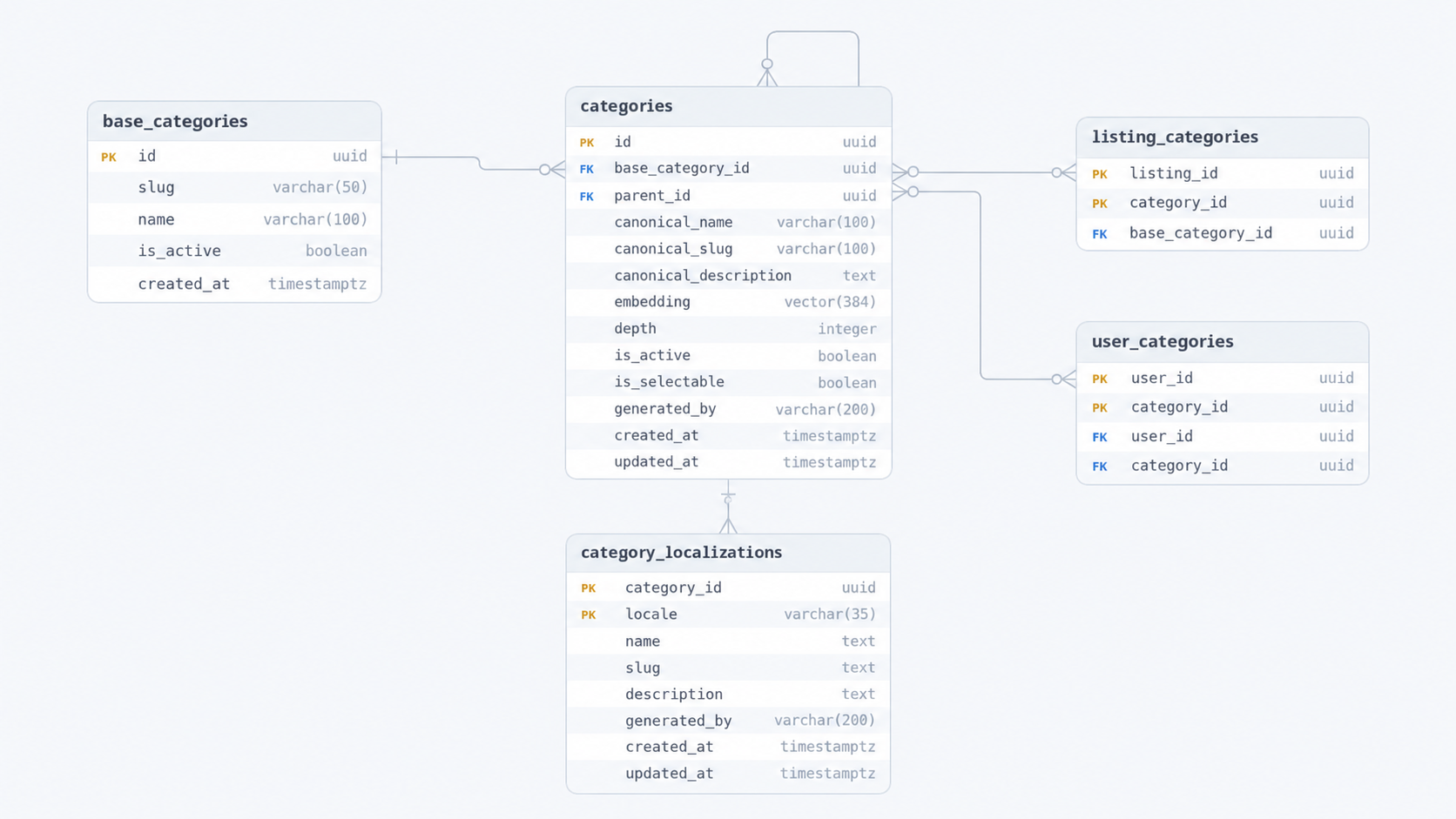
Profession example: A user published Barber
Worker does not understand Barber through a hard-coded list or a direct text-to-category lookup. It uses a controlled classification pipeline:
- Core records the request. Core saves the profession text and a new request ID. It then publishes
ProfessionPublishedthrough the outbox. Core does not classify the text or choose its language. - Worker confirms that the request is current. The queue may contain an older profession request, so Worker compares the event’s request ID with the current ID on the user before spending time on AI.
- Moderation checks the text. Worker asks an AI provider whether the text is a valid service description and whether it follows the marketplace rules. A clear rejection ends the request. A timeout or broken provider does not count as rejection; Worker tries the next configured provider or lets the queue retry.
- Worker gives AI the classification context. The request contains the profession text. Worker also supplies the active category tree that already exists under the base category. The AI is asked to detect the source locale and describe the service as a root-to-leaf path, not to return a database ID.
- AI returns structured category data. The result declares the detected source locale. For every proposed level, it contains a canonical English name, slug, and description; a name, slug, and description in the detected source language; and whether the node may be selected. The last node represents the actual profession.
- Worker validates the proposal. It checks the locale, required text, path depth, slugs, descriptions, and selectable flags. A response that is valid JSON but breaks these rules is rejected as an invalid AI result.
- Worker resolves the proposal against PostgreSQL. Starting at the root, it searches only under the expected parent. It first looks for an exact canonical match. If there is none, Ollama creates an embedding and Worker looks for a close semantic match among those siblings. It reuses a matching category ID or creates a new node when no safe match exists.
- Worker saves the result atomically. In one transaction, it checks the profession request ID again, creates any missing categories and localizations, and writes only the final selectable category to
user_categories. The second request-ID check prevents slow AI work from replacing a newer profession chosen by the user.
This means AI proposes the meaning and hierarchy, but Worker controls validation, identity reuse, tree position, and database writes.
For example, a Turkish user can publish the profession Berber. Worker asks AI for two forms of the category: a canonical English path used as the language-neutral definition, and Turkish names used for display. The canonical English path is a proposal; it does not need to exist in PostgreSQL yet. An example proposal is:
Beauty & Personal Care
  -> Hair Services
      -> Barber
Worker compares each proposed node with the existing children of the correct parent. It first checks exact canonical identity and then close embedding matches. If it finds a valid match, it reuses that category ID. If it finds no match, it creates the category.
The example below uses the simple IDs 1, 2, and 3 only to make the flow easy to read. The real PostgreSQL columns use UUIDs.
In this example, suppose no matching path exists. Worker creates it, and the final Barber category receives the example ID 3. The parent categories receive their own IDs. Category 3 becomes the permanent identity of the barber service; its displayed name can change by language without changing this ID. It describes the profession itself, not whether the provider is a person, team, shop, or company.
Imagine Berber is the first hair-service profession in a new database. The database contains the fixed base category, but none of the three proposed categories below it. Worker resolves the AI proposal from top to bottom:
base category
  -> create Beauty & Personal Care
     id: 1
      -> create Hair Services
         id: 2
          -> create Barber
             id: 3
Worker creates embedding text from each node’s canonical English path, name, and description. Local Ollama uses all-minilm:l12-v2 to turn this text into a vector. Worker compares the vector only with categories under the same parent. This parent rule prevents a concept such as computer repair under technology from matching shoe repair under personal services merely because both contain the word “repair.”
Worker saves the parent-child links and marks only the final Barber node as selectable. A selectable category may receive children later and remain selectable. If part of the path already exists, Worker reuses that part and creates only the missing nodes. For example, if Beauty & Personal Care already exists but Hair Services -> Barber does not, Worker keeps category ID 1 and creates categories 2 and 3 below it. Category creation uses a transaction lock and sibling-uniqueness rules, so two classifications cannot create the same missing root or child at the same time.
The stable category rows use the canonical English values, while category_localizations stores each Turkish name against its corresponding stable category ID. The final Berber localization points to category 3:
Güzellik ve Kişisel Bakım
  -> Saç Hizmetleri
      -> Berber
If a German user later publishes Friseur, Worker can reuse category IDs 1, 2, and 3 and add German localizations instead of creating a second barber category:
Schönheit & Körperpflege
  -> Haardienstleistungen
      -> Friseur
Provider search uses shared category ID 3, while the client shows Berber, Friseur, or Barber from the available localization.
Listing example: I need a mathematics teacher for my child
This English sentence says that a customer needs a service. Core treats it as a listing, not as the user’s profession. Its source locale is en.
Core accepts the listing. It saves the text, author, and place with status
PROCESSING. In the same transaction, it saves aListingCreatedoutbox event. The HTTP request can finish without waiting for AI.Worker receives the event and loads the listing. The listing processor checks the event and reads the current listing from PostgreSQL. If the listing was already handled or changed, Worker treats this message as a repeat or an old message.
Content checking runs first. AI checks the full sentence against the marketplace rules. An approval continues the work. A clear rejection changes the listing to
FAILEDand creates a rejection event. A timeout, rate limit, AI service error, or bad response is not a rejection. Worker leaves the listing asPROCESSINGand tries again later.AI finds the shared service category. Worker gives AI the current category tree. An example result is:
Education & Tutoring             grouping
  -> Academic Tutoring           grouping
      -> Mathematics Tutoring    final selectable category
Because the source locale is English, Worker also stores these English display names in
category_localizationswith localeen. The category is the reusable service concept. It does not store the one-time sentence “I need a mathematics teacher for my child.” Another language can later add localized names to the same category IDs.AI creates details for this listing. A separate AI call may create the English title
Mathematics Teacher Needed for My Child. It can also return a one-time or repeating duration, optional pay, currency, and end date. If the user did not give some information, the system uses allowed empty or default values. It does not add that information to the category.Worker checks both AI results. It checks the category depth, names, local names, slugs, selectable state, title, duration, currency, pay, and end date. Valid JSON is not enough. The data must also follow the business rules.
Ollama creates category embeddings. Worker creates an embedding from the English path, name, and description of each node. It compares a node only with other nodes under the same parent. It reuses an exact or close match. It creates a new node only when there is no good match.
One transaction finishes the listing. Worker locks the listing and checks its state again. It reuses or creates the path and local names. It adds
Mathematics Tutoringthroughlisting_categories, saves the details ingig_details, and changesPROCESSINGtoOPEN. If any database step fails, all these changes are undone.Worker sends result events after the transaction. It sends stable
listing_approvedandgig_category_matchedevents. If sending fails, the queue sends the input again. Worker sees that the listing is already open and sends the same event IDs again. It does not classify the listing a second time.
The listing is now public. Search can find it through the stable Mathematics Tutoring UUID, even when another user describes the same need with different words or in another language. A later listing that means the same thing can reuse this UUID instead of creating another mathematics category. Only the final active and selectable category is attached to the listing; grouping nodes remain part of the hierarchy.
Shared classification and fallback rules
Yömye does not start with a large category list made by hand. The database starts only with the base category for services. The tree below it uses lazy loading. Real listings and professions create missing categories when needed. Later, similar input reuses them. Before asking AI for a path, Worker includes the current active tree in the prompt. This helps AI choose existing categories.
Classification has three separate AI tasks. Content checking asks if the text is allowed. Category extraction finds the shared service concepts. Listing-detail extraction creates the title and fields for one listing. A listing uses all three tasks. The Berber profession uses only the first two.
Each AI task tries the fully configured services in this order. The current model configured for each provider is:
| Order | Provider | Model |
|---|---|---|
| 1 | Groq | openai/gpt-oss-120b |
| 2 | OpenRouter | openai/gpt-oss-120b |
| 3 | Gemini | gemini-3.5-flash |
| 4 | Mistral | mistral-medium-latest |
| 5 | NVIDIA | nvidia/nemotron-3-ultra-550b-a55b |
Worker tries one service at a time. If Gemini times out, reaches its limit, returns bad data, or has another error, Worker tries Groq. It continues in the listed order. A service with missing settings is skipped. The first valid answer wins. Worker saves the service and model name in generated_by. Different AI tasks for one listing may use different services.
Content checking allows 10 seconds for each service and 30 seconds in total. Category and listing-detail tasks allow 25 seconds for each service and 75 seconds in total. Cancellation or the total time limit stops the chain. If all services fail, Worker saves no part of the result. The queue can try again. Failure of all AI services never means that the content was rejected.
The queue may send either Core event again. State checks, request IDs, row locks, unique database rules, and stable result-event IDs make repeats safe. Bad or unknown event data cannot become valid later, so Worker accepts and drops it. AI, Ollama, PostgreSQL, timeout, and event-send errors may be temporary, so the queue tries them again.
Finishing a listing in one transaction
After AI and embedding work succeeds:
BEGIN
  lock listing
  verify PROCESSING, or recognize an OPEN replay
  resolve the active service base category
  reuse/create all category nodes
  ensure localizations
  attach final selectable category
  upsert gig_details and title
  set status = OPEN
COMMIT
The transaction stops an OPEN listing from missing its base category, final category, or details. If a database step fails, all changes are undone and the queue can try again.
After commit, Worker sends stable listing_approved and gig_category_matched events. If sending fails, the queue sends the input again. Worker sees the open listing, loads its saved result, and sends the same event IDs. Notification removes duplicates.
Profession events check for old requests twice. Worker checks profession_request_id before it uses AI. It checks again after it locks the user row. An old event cannot replace a newer profession request.
Queue execution
Worker limits how many messages it handles at the same time. Each message has a two-minute limit. The queue hides the message for longer than two minutes. During shutdown, Worker stops taking new messages and finishes current work. Bad event data is accepted and dropped. AI, Ollama, PostgreSQL, and event-send errors can be tried again.
Core
Core manages users, login sessions, profiles, places, listings, community content, public media records, settings, saved notifications, and the outbox. PostgreSQL is the source of truth for this data.
Core answers three questions: Who is the user? What public data exists? What is the current correct state? Other services can process Core data, but they cannot create a different identity for the same user or listing.
Authentication and session families
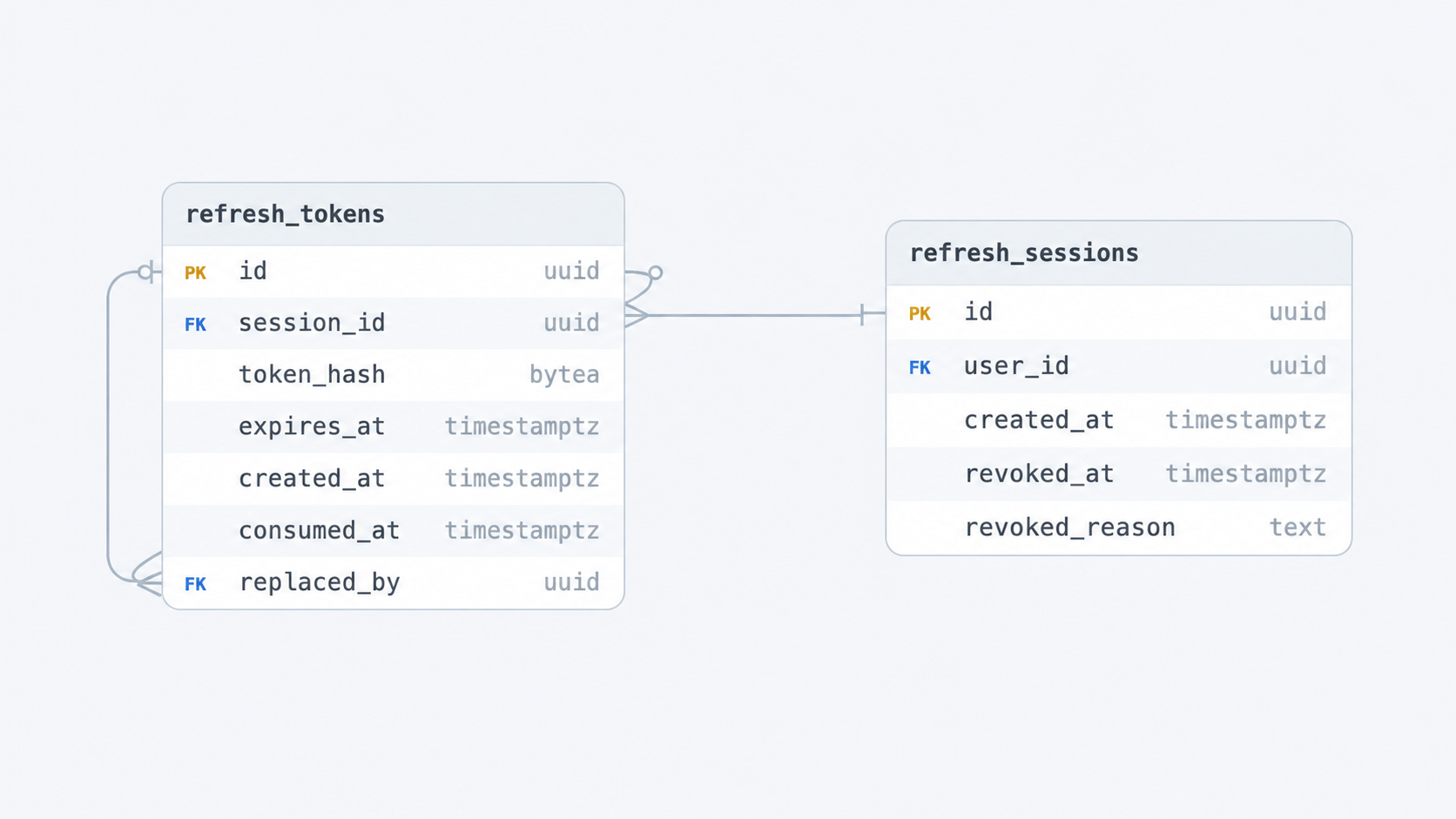
Yömye uses Google OAuth2 for login. The client sends a Google ID token to Core. Core checks the token. If the user does not exist, Core creates the user. Core then returns its own access token and refresh token. Core and Chat use the same JWT secret from GCP managed configuration.
Google ID token
    │ verify issuer, JWKS, audience and Google subject
    ▼
Core user
    ├── short-lived HS256 access JWT
    └── random rotating refresh token
The access JWT has a configured issuer, an access-token purpose marker, a user UUID, and an end time. The UUID inside the token is the user’s identity. Core does not trust a user ID sent in normal request data. Chat checks the same token rules.
A refresh token contains 32 random bytes written as hexadecimal text. The database stores only its SHA-256 hash. One Google login creates one refresh_sessions row and the first refresh_tokens row in one transaction. During refresh, Core locks the current token, marks it as used, and creates a new token. If someone uses an old token again, Core closes that session family. Other login sessions stay open.
For example, Ali signs in on a phone and a laptop. Each login creates a separate session family:
Ali
  ├── phone session:  token P1 -> token P2 (current)
  └── laptop session: token L1 (current)
The phone uses P1 and receives P2. Later, someone tries to use old token P1 again. The token may have been copied before the refresh. Core can see that P1 was already used. It closes the full phone session family, including current token P2. The phone must log in again after its short-lived access token ends. Laptop token L1 belongs to another family, so the laptop stays logged in. This protects the account without logging out every device.
Access-token lifecycle
Core creates an access token only after it finds a real Core user. Core signs it with HS256 and its secret. The token normally lasts for 15 minutes. Its main fields are:
| Claim | Purpose |
|---|---|
sub | Core user UUID and authorization identity |
iss | Must match the configured <issuer> value |
token_use | Must match <access-token-purpose>; blocks other token types from API use |
iat | Time the token was issued |
exp | Required end time |
name, avatar_url | Display data only; not used for permission checks |
Core and Chat check the signature, algorithm, issuer, purpose, end time, and sub UUID. PostgreSQL does not store the access token. This makes normal permission checks fast because they do not need a session query. However, logout cannot stop an access token at once. The token can still work until its short end time.
Refresh algorithm
When the client sends a refresh token, Core:
- creates a SHA-256 hash of the token;
- creates the next token and hash in memory;
- starts a PostgreSQL transaction;
- finds the token row by its hash;
- locks its
refresh_sessionsrow usingSELECT ... FOR UPDATE; - reads the token again after the lock, because another request may have used it while this request waited;
- rejects a closed session or an expired token;
- if
consumed_atalready has a value, closes the family with reasonrefresh_token_reuseand saves this change before returning an error; - sets
consumed_aton the current token; - inserts the new token with a new end time;
- links the old row to the new row with
replaced_by; - commits the transaction and returns the new refresh token and access JWT.
The session-row lock controls refresh, logout, and token reuse. Two refresh requests at the same time cannot create two valid current tokens.
Listing intake and transactional outbox
Classification uses AI and several database steps. These steps can be slow or fail. For this reason, Core saves the listing first. Worker handles it later.
The client sends a service listing without choosing a category. Core checks its place, rich text, owned media, and limits. It then runs:
BEGIN
  INSERT listing(status = PROCESSING, base_category_id = NULL)
  INSERT outbox_events(event_type = ListingCreated, payload = ...)
COMMIT
The outbox saves the listing and the need for classification together. A background process takes outbox rows with a lease and sends them to the classification queue. The queue may send an event more than once, so Worker must support repeats.
The exact outbox table is:
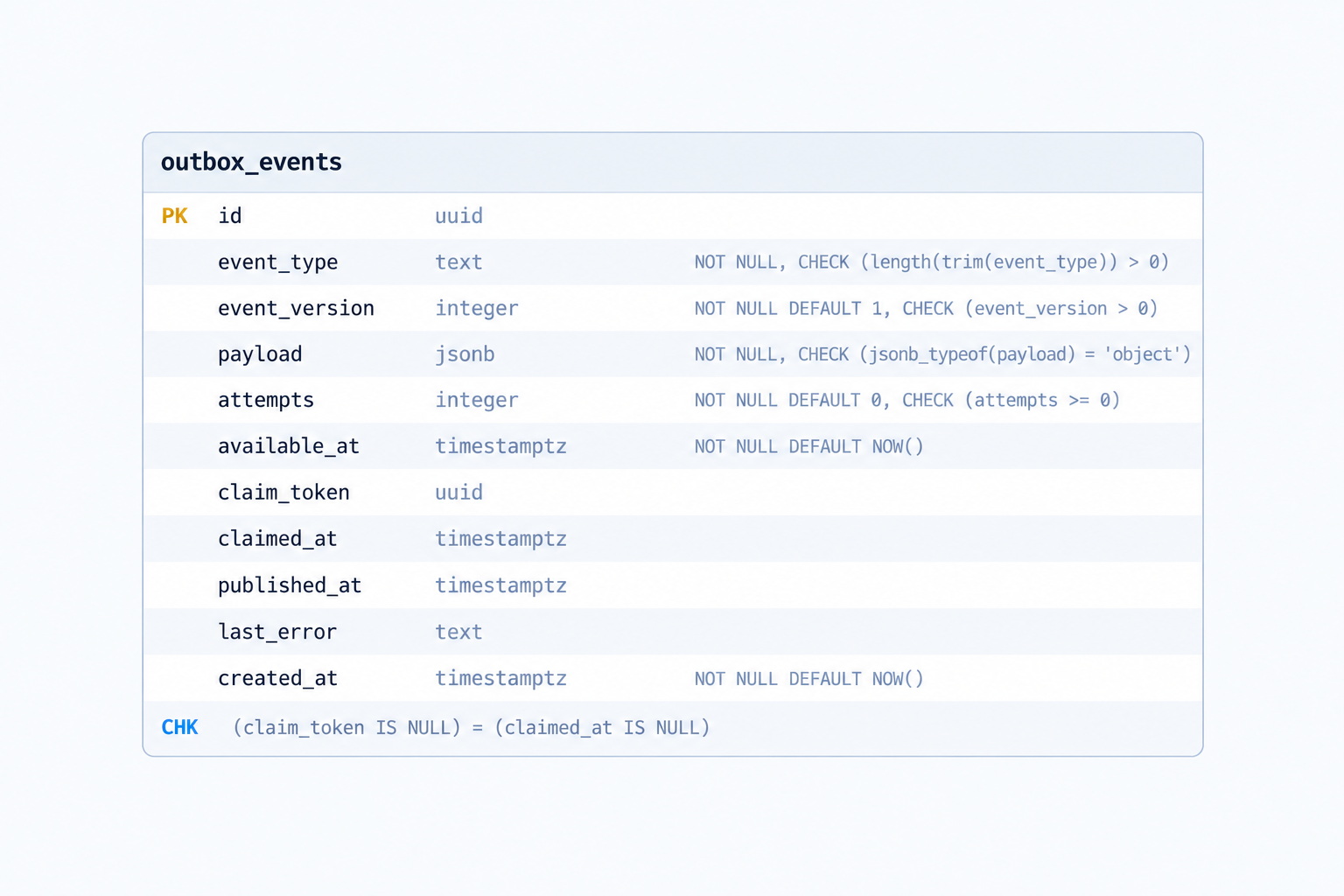
Without the outbox, saving the listing and sending the event would be separate actions. Core could stop after saving the listing but before sending the event. The listing would then wait forever. The outbox prevents this because PostgreSQL saves both records in one transaction. Sending the event can be safely tried again.
Only OPEN listings are public. Worker adds the category and typed details before it changes PROCESSING to OPEN. Slow AI or an AI error does not keep the original HTTP request open.
Public media: Cloudinary reference pipeline
Core manages public media for avatars, profile covers, listings, and posts. Media bytes never pass through Core.
Core checks permission, ownership, rules, and metadata. Cloudinary receives the large files. This keeps image and video traffic away from the application VM.
The upload flow has six steps:
- The client asks Core for upload permission. It says how the media will be used, for example as an avatar, listing image, or post video. Core checks the user and the rules for that media type.
- Core returns signed upload fields. They allow one limited Cloudinary upload to a path created by Core for that user. Core does not return its Cloudinary secret or receive the file.
- The client uploads to Cloudinary. Cloudinary receives the image or video and returns an upload result to the client. The large file does not pass through Core.
- The client confirms the upload with Core. It sends the asset ID and Cloudinary response signature. The file now exists, but Core does not trust it yet.
- Core checks and saves the asset. Core checks the signature and reads the real metadata from Cloudinary. It checks the owner path, media type, format, size, width, height, and video length. It then inserts an
image_referencesrow in PostgreSQL. - Core returns a media UUID. The client uses this Yömye UUID when it adds the media to a profile, listing, or post. It does not use a permanent Cloudinary URL.
The permission includes the user, purpose, path, media type, allowed formats, size limit, optional video limit, and end time. Core never returns the Cloudinary secret.
Core does not trust metadata from the client. It checks the Cloudinary signature and owner path. It then gets the real metadata from Cloudinary and checks all limits. Only then does it create an image_references row.
The exact public-media tables are:
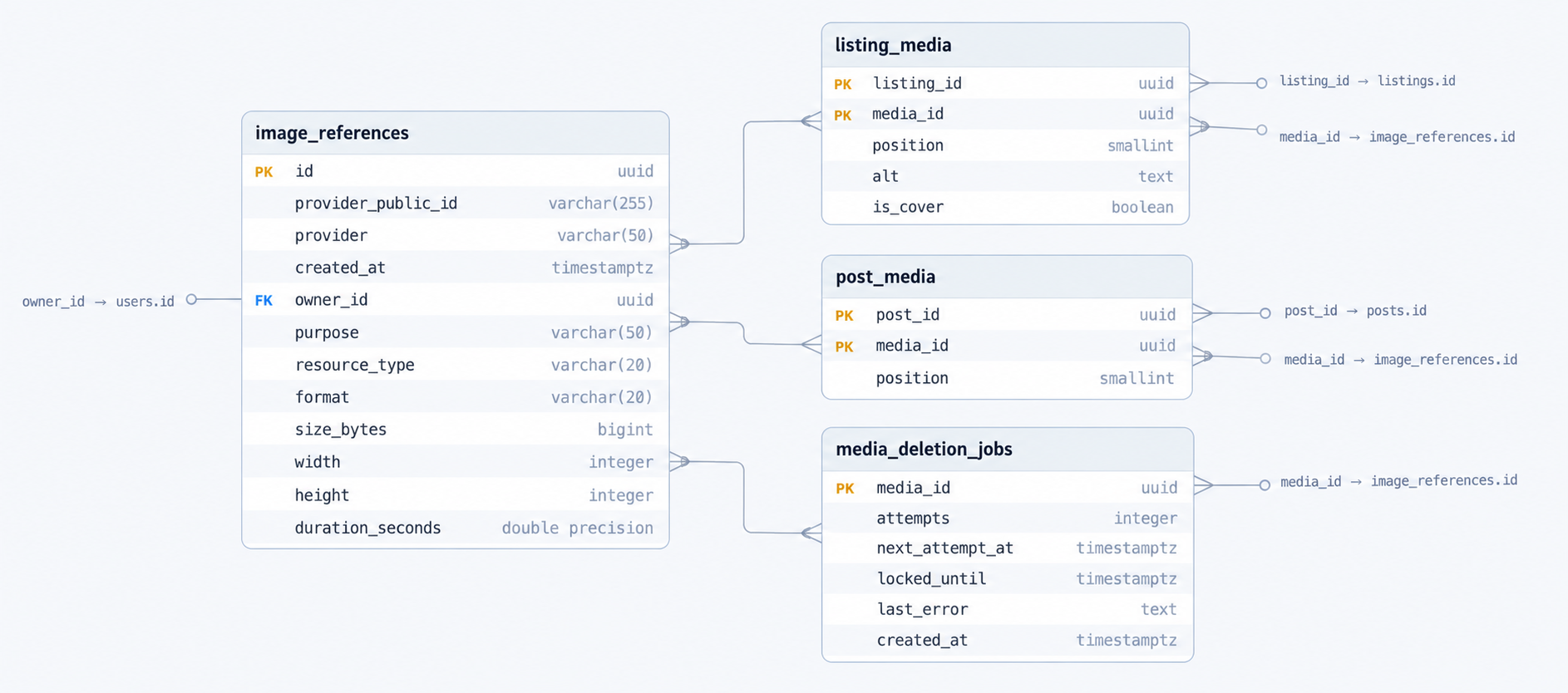
Confirmation and use are two separate steps. After confirmation, the client must still add the UUID to a profile, listing, or post. That part of Core checks the owner and purpose again. PostgreSQL triggers also check important owner, purpose, and count rules.
Confirmation means, “this valid file exists and belongs to this user.” Attachment means, “this file is now part of this profile, listing, or post.”
Application tables store the media UUID, not a permanent URL. Core asks Cloudinary for the right version when needed. One media record can provide a thumbnail, a limited-size feed image, a large view, a limited MP4 video, or a video cover image.
When the application removes media, it creates a media_deletion_jobs row in the same transaction. Cleanup workers take jobs with FOR UPDATE SKIP LOCKED and a lease. They delete the Cloudinary file and then its Core record. A temporary Cloudinary error makes the job wait and try again later. It does not undo the post deletion or listing cancellation.
Upload rules depend on purpose. Avatars allow small JPEG, PNG, or WebP files. Covers, listing images, and post images have larger limits. Listing and post videos allow MP4, QuickTime, or WebM files up to 60 seconds. A listing or post can have up to six images and one video. A listing cover must be one of its attached images. An image inside rich text must use an attached media UUID owned by the same user. It cannot use any outside URL.
There are some limits. If the client uploads a file but never confirms it, the file can stay in Cloudinary because Core does not know it exists. Cloudinary IDs prevent duplicate confirmation, but confirmation is not a general retry system. Media should be removed through its profile, listing, or post so Core can create the deletion job. Public media is returned inside profile, listing, and post responses. There is no general public endpoint for any media ID.
Location and provider discovery
Yömye uses GeoNames for place data. GeoNames provides countries, regions, towns, local names, coordinates, population, and time zones. Yömye does not copy the full world dataset into PostgreSQL. It uses lazy loading. Core searches GeoNames online and saves a place only when a user selects it.
The search-and-import flow is:
- The client searches inside one country. It sends at least two letters and a two-letter country code, such as
q=Kadıköy&country_code=TR. This stops places with the same name in other countries from mixing with the results. - Core searches GeoNames. This does not change the database. Core returns choices with a GeoNames ID, country, place name, type, region names, and a label such as
Kadıköy, İstanbul, Türkiye. - The client selects a place. It sends
source=geonames, thesource_id, and the expected country code to Core. - Core gets the full place path. It asks GeoNames for the place and its parents. It checks that the ID and country are correct. It keeps supported region (
A) and populated-place (P) items. - Core imports the path in one transaction. It inserts or updates the country, all needed parents, and the selected place. For Kadıköy, this may save Turkey, İstanbul, and Kadıköy and connect them with
parent_id. The unique GeoNames ID lets later selections reuse the same rows. - The profile or listing stores Yömye UUIDs. It uses
country_idandplace_id, not a place name or coordinate sent by the client.
Four tables store the imported places:
countriesstores a Yömye UUID, GeoNames ID, two-letter code, main name, active state, and update times.country_namesstores a display name for each country and language.placesstores regions and populated places. It includes the GeoNames ID, country, parent, names, type, latitude, longitude, PostGIS point, population, time zone, and active/selectable state.place_namesstores local names and search names. For example,MünchenandMunichcan point to the same place UUID.
Their exact schemas are:
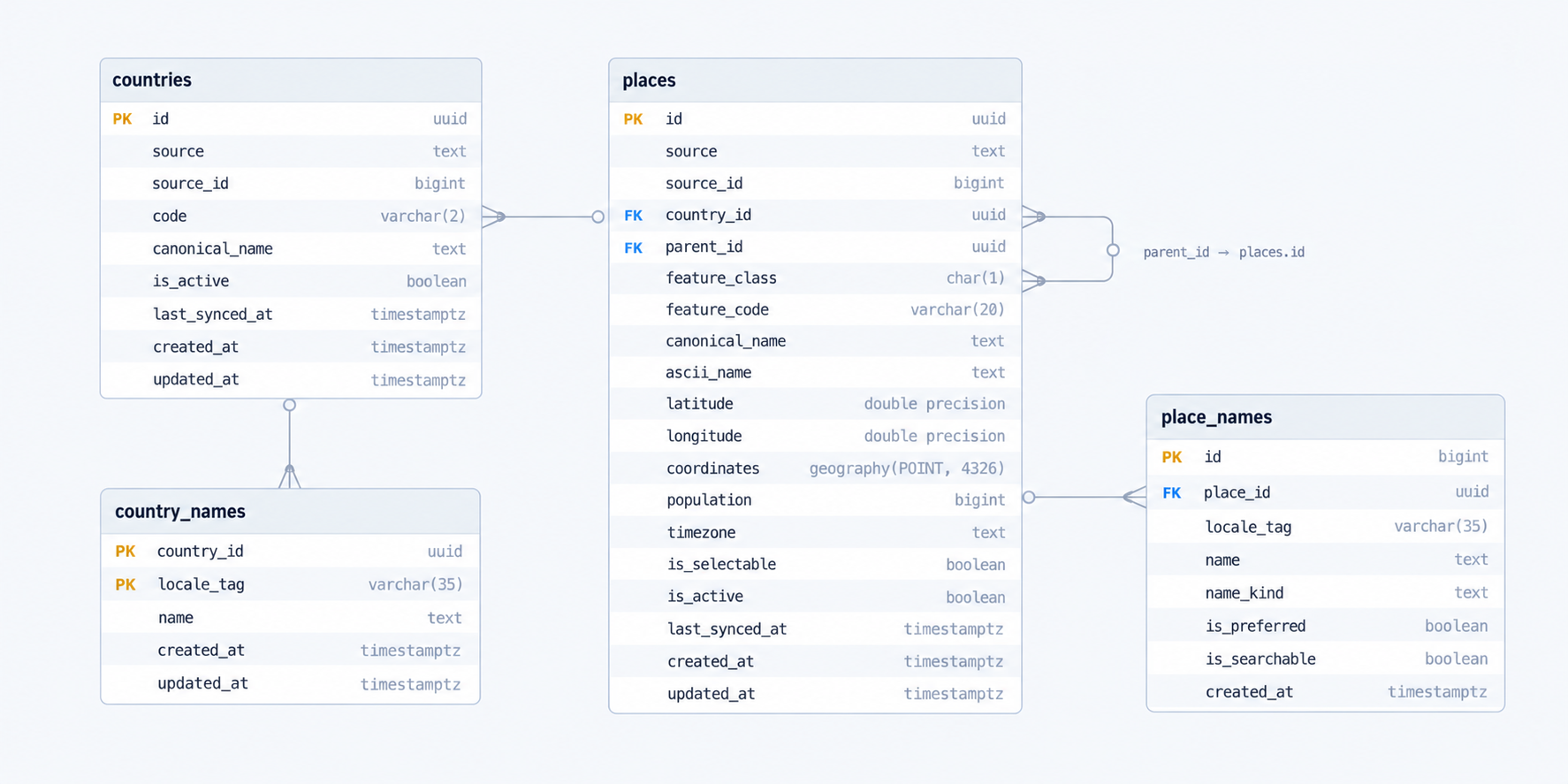
The database grows when people use new places. If nobody selects a village, Yömye does not need a row for it. After selection, profiles, listings, privacy rules, and place searches can reuse its ID and parent path. Database rules require the place to be active, selectable, and inside the selected country. A user cannot combine a Turkish country with a German place.
Users choose how much place data appears on their public profile. place shows the local place path. country shows only the country. hidden shows neither. Exact coordinates always stay on the server.
Nearby search uses the logged-in user’s saved place as the start point. PostGIS calculates distance. The API never returns exact coordinates and rounds distance to 100 metres. A limited country search can work without login, but it does not show distance. Worker writes the provider’s profession category UUID. Core reads and translates that category for the response, but Core never creates category nodes.
Internal processes
Chat calls Core’s private gRPC API for current user and listing summaries. Core also runs small background loops. They send outbox events, delete Cloudinary media, remove old FCM tokens, and check readiness. If PostgreSQL is not working, Core is not ready. An OpenTelemetry export error does not make Core unready.
Public media cleanup
Core runs a public-media cleanup loop inside the Core process. It is not a separate deployed service. When a listing image is replaced or removed, a listing is cancelled, a post is deleted, or an old profile cover is replaced, the same database transaction adds the unused media ID to media_deletion_jobs. This keeps the application change and the cleanup request consistent even if Core stops immediately afterward.
The cleanup loop runs once when Core starts and then every 30 seconds. Each pass claims up to 20 due jobs with database row locks, SKIP LOCKED, and a five-minute lease. This allows more than one Core process to run without normally deleting the same asset at the same time.
For each claimed job, Core deletes the public asset from Cloudinary and then deletes its image_references row. The job disappears through its cascading foreign key. If Cloudinary deletion fails, Core keeps the reference, records a limited error message, releases the claim, and schedules another attempt with exponential backoff. The delay grows from one minute to a maximum of 64 minutes. Core cancels the loop during graceful shutdown before it closes the database connection.
Notification
The Yömye Notification repository contains the shared notification pipeline. Notification reads events, finds recipients, saves inbox rows, prevents duplicates, stores translation data, and sends Firebase push messages. Event producers only report what happened. They do not choose the final message text.
Notification Tables
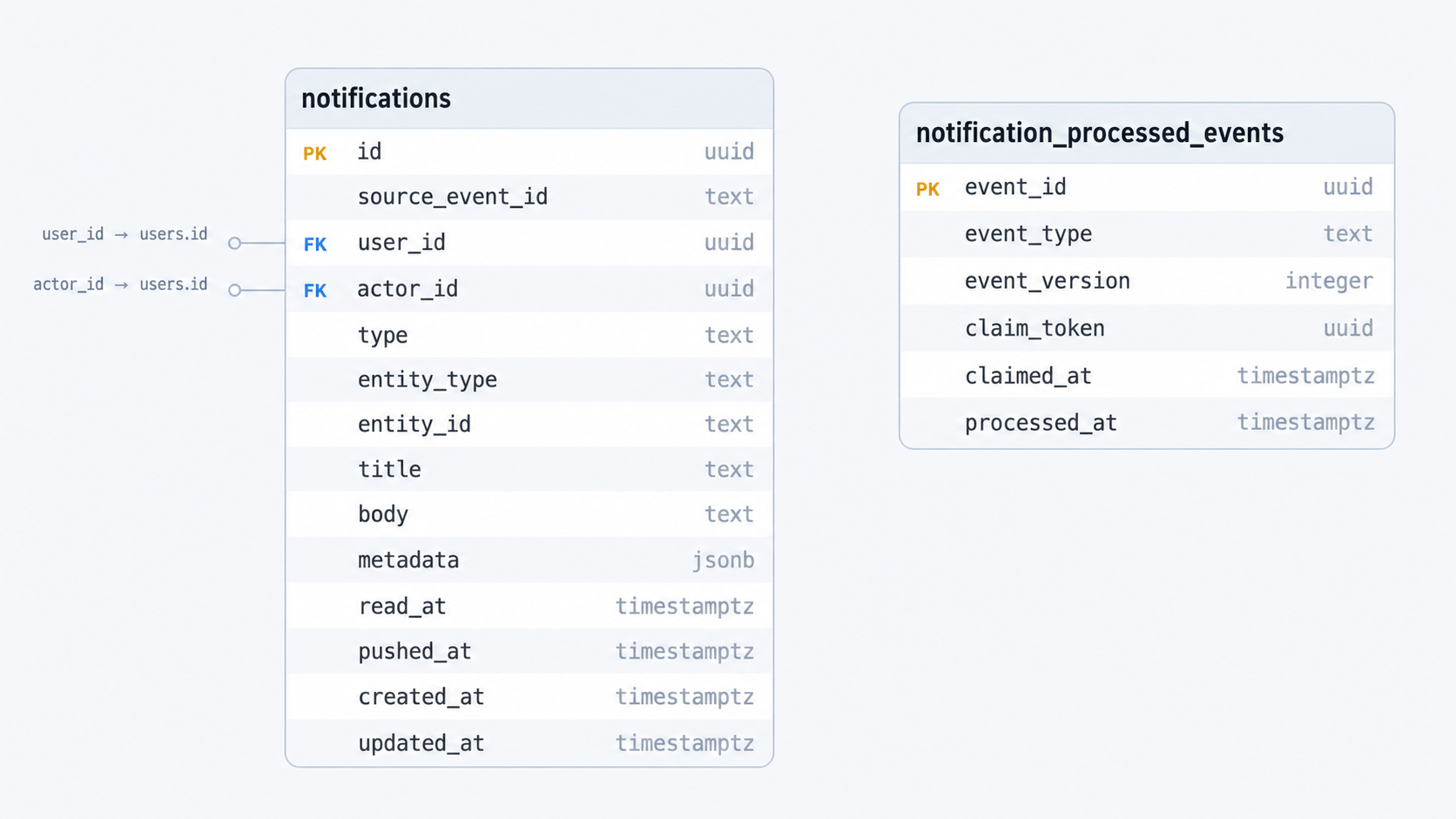
The word “notification” means two different results:
- a saved in-app inbox row that the user can read later;
- a push alert that tries to get the user’s attention on a device.
The inbox item must still exist when the user has no device token or Firebase is down. For this reason, Notification saves the inbox row before it sends a push message.
Dispatcher and renderers
Each event needs different data and display rules. A new message needs sender and thread data. A listing approval needs listing data. A category match may need many users. The dispatcher keeps these rules out of one very large handler.
The common event envelope contains a type and event data. It also contains a version and stable event ID when needed. Dispatcher connects each event type to one renderer. It can also connect it to a fan-out resolver.
A renderer checks one event object and builds:
- the PostgreSQL inbox notification;
- the Firebase push data, including navigation and translation data.
To add a normal event, a developer adds an event object, renderer, registration, and tests. There is no need to add a new switch in many parts of the service. A resolver is needed only when Notification must find the recipients, for example users who follow a category and place.
Why adding a notification does not change the service pipeline
The SQS and Pub/Sub handlers only read an Envelope and call Service.Handle. They do not know about new_message, listing_approved, or any future event type.
The service has no event-type switch. It asks the dispatcher what to do:
type Renderer interface {
    Render(
        ctx context.Context,
        payload json.RawMessage,
    ) (*Notification, *PushNotification, error)
}

type Dispatcher struct {
    renderers map[NotificationEventType]Renderer
    fanOuts   map[NotificationEventType]Resolver
}
At startup, the application creates the renderers and registers them:
dispatcher := NewDispatcher()

dispatcher.Register(EventNewMessage, NewNewMessageRenderer())
dispatcher.Register(EventListingApproved, NewListingApprovedRenderer())
dispatcher.Register(EventGigCategoryMatched, NewGigCategoryMatchedRenderer())

dispatcher.RegisterFanOut(
    EventGigCategoryMatched,
    NewGigCategoryMatchedResolver(subscriberRepository),
)
Service.Handle follows the same algorithm for every type:
envelope type
  -> dispatcher.Renderer(type)
  -> optional dispatcher.FanOut(type)
  -> renderer.Render(payload)
  -> persist
  -> load tokens
  -> push
For a normal event that already has one recipient, a developer only needs to:
- define the event type and data object;
- create one renderer that checks the data and returns the inbox and push models;
- register the renderer during startup;
- add the translation key to the client and contract tests.
The transport handlers, main service flow, PostgreSQL code, Firebase code, duplicate protection, and retry rules do not change.
For example, application_accepted could look like this:
type ApplicationAcceptedEvent struct {
    RecipientID  string `json:"recipient_id"`
    ActorID      string `json:"actor_id"`
    ApplicationID string `json:"application_id"`
}

type ApplicationAcceptedRenderer struct{}

func (r *ApplicationAcceptedRenderer) Render(
    ctx context.Context,
    raw json.RawMessage,
) (*Notification, *PushNotification, error) {
    // Decode and validate UUIDs.
    // Build entity_type/application navigation data.
    // Add translation key + values.
    // Return both models; do not save or call Firebase here.
}

dispatcher.Register(
    EventApplicationAccepted,
    NewApplicationAcceptedRenderer(),
)
The renderer only changes event data into notification data. It does not open database transactions, read SQS information, or call Firebase. This keeps each new event type small. It also keeps notification text out of the event producers.
When a resolver is needed
Some events do not include a recipient. For example, gig_category_matched describes a category and place match. Its resolver finds all current subscribers and returns event data for each user. Each result then uses the same render, save, and push steps.
The renderer still handles one input for one user. Fan-out does not force every renderer to understand user lists, pages, or subscriber queries.
Processing one notification
claim logical event
  -> find recipient data, if required
  -> build inbox + push models
  -> save notification row
  -> if already pushed: stop
  -> load recipient FCM tokens
  -> if no tokens: keep inbox row and succeed
  -> send per device
  -> delete only proven UNREGISTERED tokens
  -> fail on temporary device/provider errors
  -> mark pushed_at
  -> complete event claim
Notification saves the inbox row before push. A missing device token or Firebase error cannot remove the inbox item. pushed_at means push work ended without a temporary error. It does not prove that the device showed or the user read the message.
Showing notifications in the user’s language
If Notification stored only final Turkish or English text, the inbox item could not change language. Instead, it stores the meaning and the values needed to build the text. The client chooses the language.
Notification does not choose the user’s language. It saves and sends data like this:
{
  "type": "listing_approved",
  "entity_type": "listing",
  "entity_id": "listing-uuid",
  "localization_key": "notifications.listing_approved",
  "localization_args": "{\"title\":\"Bahçe Bakımı\"}"
}
FCM allows only string values, so the arguments are JSON text there. PostgreSQL stores them as an object. The client uses its current language files and falls back to Turkish. Old title and body fields can remain for old clients, but they are not the main source.
Preventing duplicates
The queue may retry after a timeout even when the first attempt finished. A saved event claim stops the same notification from being created and pushed twice.
Worker events use a stable event_id. Notification gets a PostgreSQL claim with a lease:
ACQUIRED          -> process
ALREADY_PROCESSED -> acknowledge without another push
IN_PROGRESS       -> retry later
Notification completes the claim only after all required work. A temporary failure releases it. If the process stops, the lease ends later.
For new_message, Chat’s message ID becomes source_event_id and a stable claim UUID. The thread ID stays in entity_id so the client can open it. Different messages in one thread stay separate. A repeated event for the same message cannot create another push.
Firebase outcomes
Notification handles the FCM result for each device:
- clear
UNREGISTERED: delete that token and do not try it again; - timeout, network, limit, or temporary Firebase error: keep the token and retry the record;
- general
INVALID_ARGUMENT: keep the token because this does not prove it is bad; - mixed results: keep successful work and token cleanup, but return a temporary error if any device needs a retry.
FCM tokens are secret values and never appear in logs. Core manages registration and update times. Notification only reads them. Registration requires login and inserts or updates the row. One installation token is unique in the whole system. It can move to the current user in one database action when the device logs into another account. Clients register at login or startup and whenever Firebase changes the token. They should remove it during logout when possible.
Core stores a last-seen time and optional device-platform data. A small cleanup job removes tokens that have not been updated for a set time. Notification removes a token only when Firebase clearly says it is not registered. These checks solve different problems. Core removes old, unused app installations. Notification removes tokens that Firebase rejects during delivery.
Chat
Chat manages listing conversations, social direct messages, messages, private file records, member permissions, and real-time delivery. MongoDB is the source of truth. Cloudflare R2 stores the files.
One-time WebSocket authentication
Each WebSocket starts as an HTTP request and then stays open. It is unsafe to put a reusable access JWT in the URL. Browsers, proxies, load balancers, and logs may save URLs. Chat uses a short-lived, one-use ticket instead.
The client sends its access JWT over HTTP and receives a random ticket. Chat saves only the SHA-256 hash of the ticket. The ticket cannot last longer than its own limit or the original JWT.
Core access JWT
   -> POST /ws/ticket
   -> single-use ticket
   -> /ws or /ws/direct upgrade
   -> use once; a second use fails
Every reconnect needs a new ticket. Even a failed connection may use the ticket, so the client must ask for a new one. The socket cannot stay open after the Core access token ends. Chat checks browser origins against an exact allowed list. Native apps can connect without an Origin header.
Saving a message and replying to the sender
The connection can close after MongoDB saves a message but before the sender gets a reply. Chat therefore needs a clear message reply and a stable ID for each message. WebSocket delivery alone is not enough.
Every message has a stable client_message_id. Its unique retry key is:
(sender_id, client_message_id)
Processing order is:
authorize participant and current domain state
  -> validate content and attachment IDs
  -> create or load message by its retry-safe key
  -> commit message and attachment transitions
  -> send message.accepted
  -> broadcast only when newly created
  -> publish offline event only when newly created
If MongoDB saves the message but the reply is lost, the client reconnects and sends the same ID again. Chat returns the saved message. It does not save, broadcast, attach files, or notify twice.
The client keeps each outgoing message in a local state such as pending -> accepted. It must keep the same client_message_id, conversation, text, and file IDs after reconnects and app restarts. A lost connection means the result is unknown. It does not mean saving failed. A new ID means a new message and may create a duplicate for the user.
Private attachments in Cloudflare R2
The R2 bucket is private. Files do not pass through Chat. Chat never shows R2 secrets, saves permanent signed links in messages, or puts storage keys in notifications.
Selecting a file does not add it to a message at once. First, Chat creates an upload record. The client uploads directly to R2. Chat checks the uploaded file. A message can use the file only after these steps. The state shows the current step.
An attachment can follow one of two paths.
The successful path is:
PENDING_UPLOAD: Chat has authorized an upload, but the client has not confirmed the R2 object yet.READY: Chat has checked the uploaded object’s metadata. The file may now be added to a message.ATTACHED: Chat saved the message and attached the file in the same MongoDB transaction. Normal expiration cleanup no longer applies to it.
The unused-file cleanup path is:
- A
PENDING_UPLOADorREADYrecord reaches its expiration time without becoming attached. - The cleanup worker claims it and changes its state to
DELETING. - Chat deletes the private object from R2.
- Chat changes the MongoDB record to
DELETED. If R2 deletion fails, the record stays inDELETINGand is retried later.
Upload authorization
The client sends the file name, MIME type, exact size, and conversation or first-contact area. Chat first checks that the sender can communicate there.
Chat creates an attachment ID and an R2 key that the server controls. It saves a PENDING_UPLOAD record and returns a short-lived signed PUT URL. The client must use the exact content type and If-None-Match: * headers. This makes the URL write only once, so it cannot replace an existing file.
Confirmation
After the direct R2 upload, the client confirms the file. Chat sends an R2 HEAD request. It compares the real MIME type and byte size with the declared values and file rules. A full match changes PENDING_UPLOAD to READY. A file that was uploaded but not confirmed cannot be used. Confirming an already READY or ATTACHED file is safe and does not create another result.
Adding files and the message in one transaction
For each file in a message, Chat checks that:
- it is
READYand has not expired; - the sender owns it;
- it belongs to the same listing or direct-message area;
- the request does not list it twice.
Chat saves the message and changes every file from READY to ATTACHED in one MongoDB transaction. It cannot save a message with only some files. A repeated message request returns the first transaction result.
Download
A recipient asks to download a file by attachment ID. Chat checks current conversation membership and allows only READY or ATTACHED files. It then returns a short-lived signed GET URL. Chat creates the URL after the permission check and never saves it in the message.
This design checks conversation membership, keeps storage keys under server control, uses short-lived links, checks file metadata, and changes states in one transaction. It does not yet scan for malware, inspect file bytes, check codecs, provide end-to-end encryption, or check the real video length.
Offline notification event
After Chat saves a new message, it sends a new_message event for an offline user. The event has safe routing data and a short preview. message_id prevents duplicate work. The thread or conversation ID tells the client where to open. Private R2 links and keys are never included.
Private attachment cleanup
Chat runs a private-attachment cleanup loop inside the Chat process. It is not a separate deployed service. The loop starts with Chat, drains all cleanup work that is currently due, and checks again every 15 minutes.
An attachment becomes eligible when it remains PENDING_UPLOAD or READY after its expiration time. A failed earlier deletion in DELETING also becomes eligible when next_deletion_at arrives. Chat atomically claims one attachment by changing it to DELETING, increasing its deletion-attempt count, and setting a five-minute retry time. It then deletes the private object from Cloudflare R2 and marks the MongoDB attachment record as DELETED.
If R2 deletion fails, Chat keeps the record in DELETING and schedules another attempt. The delay grows with the attempt count and is capped at one hour. The cleanup loop is cancelled during graceful shutdown before MongoDB and R2 dependencies are closed. ATTACHED files are not expiration-cleanup candidates because they belong to saved messages.