Project
distributed chat application
A scalable chat application built with Spring Boot microservices, WebSockets, RabbitMQ, Redis, MongoDB, Docker, and Kubernetes.
Distributed Chat Application
This project is a distributed chat application. Its main purpose was to explore microservices and important distributed system concepts such as scalability and availability. It was also a practical way to work with Docker, Kubernetes, and several levels of automated testing. The chat features are simple because the main focus of the project was learning how a distributed system works in practice.
The application allows a user to create an account, log in, create a room, join a room, and send messages. A guest can also enter a room and read its messages, but a guest cannot send a message.
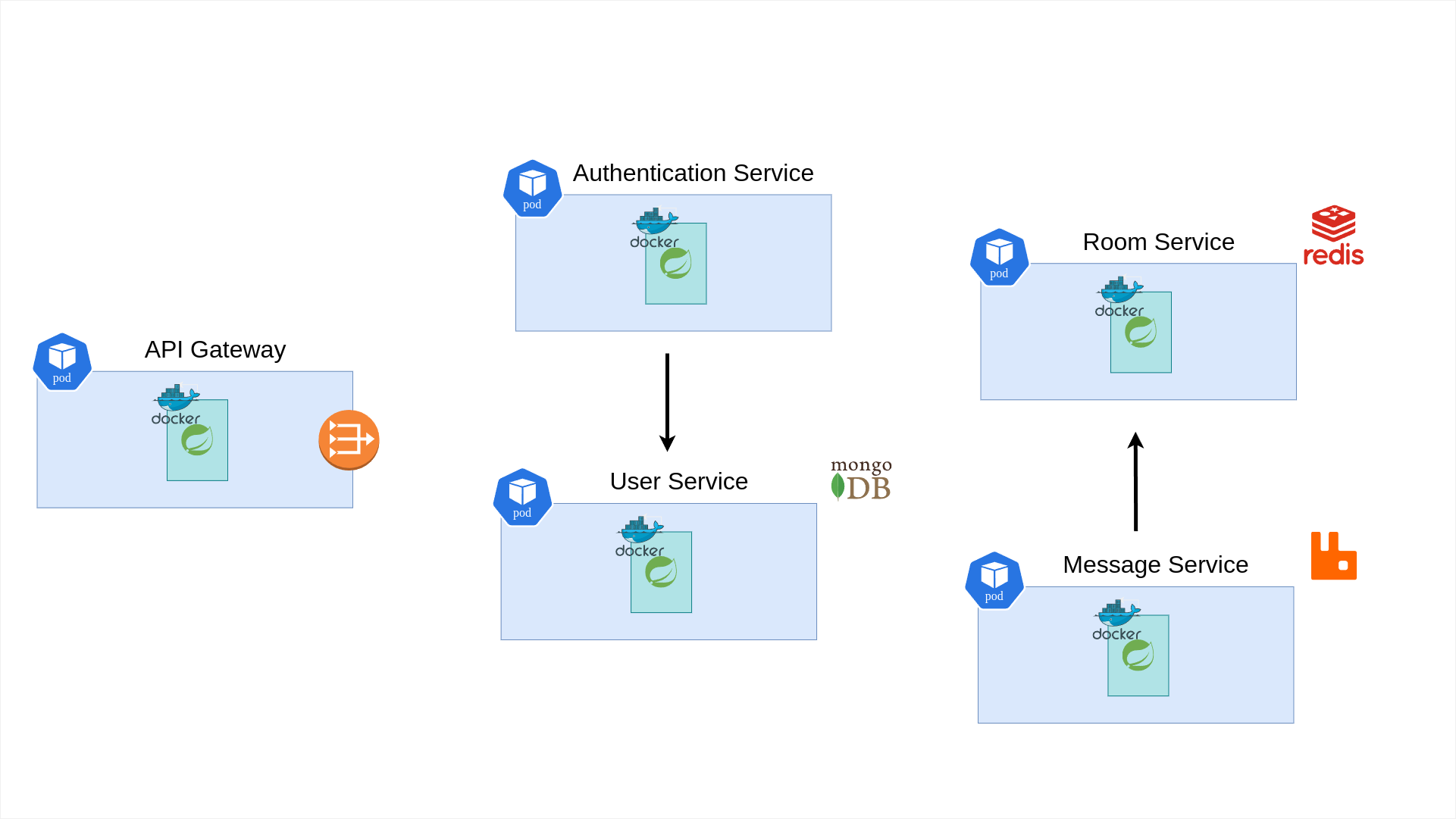
The architecture was designed so it could be integrated into a live stream application similar to Twitch. For example, a streaming platform could create one room for each live broadcast and place the chat beside the video player. Viewers could connect as guests and read the conversation. Signed in viewers could join as members and send messages. The streaming application would manage the video, channels, and creators, while this project would manage chat identity, room presence, and live message delivery.
The backend consists of five microservices, as shown in the diagram above. Each service has one clear job. The API Gateway routes requests and protects actions that require authentication. The User Service manages user accounts. The Authentication Service manages registration and login. The Room Service manages active rooms and members. The Message Service manages live chat.
Docker packages each service, and Docker Compose provides the local development environment. Kubernetes is used for cluster based development and for the staging and production environments.
Each service has its own GitHub repository and a published image on Docker Hub.
- API Gateway on GitHub and Docker Hub
- User Service on GitHub and Docker Hub
- Authentication Service on GitHub and Docker Hub
- Room Service on GitHub and Docker Hub
- Message Service on GitHub and Docker Hub
The services are written with Java 17 and Spring Boot. Spring WebSocket and STOMP are used for live communication.
The project uses unit tests, integration tests, end to end tests, and Pact contract tests. The test types differ by service according to the responsibility of that service.
Development and deployment environments
The project has separate support for development, testing, and production. Each backend service contains a Dockerfile, a docker-compose.yml file, and its own deployment.yml file.
The five service Dockerfiles use multiple build stages named base, test, dev, builder, and prod.
The dev stage starts the development environment. Docker Compose mounts the source directory and local Maven cache into the container to make development faster.
The test stage runs the service tests.
The builder stage creates the production JAR with the production Maven profile. It also uses jlink to create a smaller Java runtime for the final production image.
The production stage of each service follows this pattern, as shown in the Authentication Service Dockerfile:
FROM eclipse-temurin:17-alpine AS builder

WORKDIR /build

COPY .mvn .mvn
COPY pom.xml mvnw ./
COPY src src

RUN --mount=type=cache,target=/root/.m2 \
    ./mvnw clean package -DskipTests -Pproduction

RUN $JAVA_HOME/bin/jlink \
    --module-path $JAVA_HOME/jmods \
    --add-modules ALL-MODULE-PATH \
    --output /jre \
    --compress=2 \
    --no-header-files \
    --no-man-pages
Each service directory also contains a Kubernetes deployment.yml. These files describe the service pod, its internal Kubernetes Service, its environment variables, and its Secrets or ConfigMaps. The service level Kubernetes files support a self contained cluster setup. The root staging and production files support full environment deployments with published container images.
Testing strategy
Testing was a large part of this project. A distributed system can fail inside one class, between the layers of one service, or at the connection between two services. For this reason, the project does not depend on only one kind of test.
Unit tests
Unit tests check one class or one rule without starting the complete system. Dependencies are replaced with mocks when needed.
The tests cover JWT signing and parsing, password hashing and comparison, controller responses, room rules, authentication logic, subscription rules, and WebSocket session management.
Some examples are JWTSignerTest, JWTParserTest, JWTValidatorTest, PasswordManagerTest, AuthenticationServiceTest, UserServiceTest, RoomServiceTest, SubscriptionInterceptorTest, and SimpWebSocketSessionManagerTest.
These tests are fast. They are useful for checking small rules, such as rejecting an invalid token, blocking a guest message, or refusing a duplicate username.
Integration tests
Integration tests check whether several real parts work together. The repository has integration tests for controllers, repositories, services, Redis access, MongoDB access, and WebSocket configuration.
For example, UserRepositoryIntTest saves and reads users through UserRepository. RoomServiceIntTest, MemberServiceIntTest, and MemberRepositoryIntTest check the real Redis repository and service layers. WebSocketConfigIntTest checks the WebSocket setup instead of testing only one method.
These tests can find problems that unit tests cannot see, such as wrong Spring configuration, wrong repository queries, object mapping errors, or a problem between a service and its database.
End to end tests
The end to end tests start a larger part of a service and use its real entry point.
The User and Room services use Spring MockMvc to send HTTP requests through the controller, service, and repository layers. UserControllerIntTest, RoomControllerE2ETest, and MemberControllerE2ETest check response codes and JSON data for account creation, room creation, room listing, room lookup, joining, and leaving.
The Message Service has real WebSocket and STOMP tests. PublishingMessagesE2ETest, PublishingJoinMessageE2ETest, and PublishingLeaveMessageE2ETest connect to a random server port, subscribe to room topics, send frames, and wait for real events. The tests confirm that a guest cannot send a message, an authenticated member can send messages, and JOIN and LEAVE events reach subscribers.
One message test sends 100 messages and waits until all 100 arrive. This checks more than a controller method. It checks the WebSocket connection, STOMP routing, authorization, message conversion, and publishing flow together.
The test uses a latch to confirm that every published message returns through the WebSocket subscription:
CountDownLatch latch = new CountDownLatch(100);

webSocketSession.subscribe(subscribeHeaders, new StompFrameHandler() {
    @Override
    public Type getPayloadType(StompHeaders headers) {
        return RoomMessage.class;
    }

    @Override
    public void handleFrame(StompHeaders headers, Object payload) {
        RoomMessage message = (RoomMessage) payload;
        assertTrue(message.getAction().getType().equals(RoomMessageAction.Type.STANDARD));
        latch.countDown();
    }
});

for (int i = 0; i < 100; i++) {
    webSocketSession.send(messageHeaders, "Mr White!");
}

boolean sent = latch.await(10, TimeUnit.SECONDS);
assertTrue(sent);
Contract tests
The project uses Pact for service contract testing. Contract tests are very important in a microservice system because two services can work correctly alone but still disagree about a URL, request body, status code, or response format.
There are two tested service relationships.
- The Authentication Service is the consumer of the User Service.
- The Message Service is the consumer of the Room Service.
The consumer tests describe the exact request and response that the consumer expects. For example, Authentication expects the User Service to support user creation and credential validation. The tests cover success, invalid input, an existing username, and wrong credentials.
The Message Service contracts describe member creation, member removal, and member lookup. They also describe what should happen when a room does not exist.
The consumer contracts are defined in AuthenticationServiceContractTest and ExternalRoomServiceContractTest. The provider verification tests run these contracts against the provider controllers. AuthenticationServiceContractVerificationTest checks the User Service. MessageServiceContractVerificationTest checks the Room Service. Pact Broker configuration is included so contracts can be shared between the service pipelines.
This creates a useful safety check. A provider cannot change an endpoint in a way that breaks its consumer without a contract test showing the problem.
Observability and service discovery
The services include Spring Boot Actuator, Micrometer, OpenTelemetry, and Zipkin support. Their production settings can send trace information to a Zipkin compatible tracing service. This helps follow one request as it moves between services.
The services also include Eureka client configuration for service registration and discovery. The gateway contains routes for the discovery and tracing interfaces. The Discovery Service and Tracing Service are not included in this repository, so they were expected to run as external platform components.
API Gateway
The API Gateway is simple and stateless. It routes requests to the downstream services. It sends authentication requests to the Authentication Service, room requests to the Room Service, and WebSocket connections to the Message Service.
The gateway protects room creation. When a user wants to create a room, the gateway checks the JWT token. If the token is valid, it reads the user ID, username, and profile picture from the token. It then sends this information to the Room Service.
The gateway does not store application data. Because of this, more gateway instances can be started when traffic grows.
Authentication Service
The Authentication Service handles registration and login.
When a user registers, this service asks the User Service to create the new user. When a user logs in, it asks the User Service to check the username and password.
After a successful registration or login, the service creates a JWT token. The token contains the user ID, username, and profile picture. The client uses this token for actions that need authentication.
This service does not store users. Its job is to manage the authentication process and create tokens.
User Service
The User Service manages user accounts and uses MongoDB to store user information. Only the User Service connects directly to this database. This keeps user data in one place and gives the service a clear responsibility. The Authentication Service communicates with it through HTTP requests.
It creates new users, checks login details, validates usernames, and hashes passwords with BCrypt.
Security and validation
The Authentication Service creates a signed JWT after registration or login. The token contains the user ID, username, profile picture, issue time, expiration time, issuer, and a unique token ID. A normal token is valid for one day.
The API Gateway and Message Service verify the token locally with the same signing secret. This avoids a call to the Authentication Service for every protected action. The gateway protects room creation, while the Message Service protects live message sending.
The JWTSigner signs the token with the user data and a one day expiration:
String jws = Jwts.builder()
        .signWith(secretKey)
        .claims(claims)
        .issuer("http://authentication-server")
        .expiration(expireAfterMS == null ? new Date(System.currentTimeMillis() + expireAfterOneDay)
                : new Date(System.currentTimeMillis() + expireAfterMS))
        .issuedAt(new Date())
        .id(UUID.randomUUID().toString())
        .compact();
The request models also define basic input rules. Usernames contain between 2 and 18 characters, passwords contain between 7 and 40 characters, and room titles contain between 10 and 100 characters. Password hashes are not returned in user responses.
Room Service
The Room Service manages active rooms and their members. It stores this data in Redis because rooms and memberships are temporary and need fast access.
The Message Service also uses this service when a person joins or leaves a room. A user can have more than one WebSocket session. For example, the same user may open the chat on two devices.
The Room Service runs a cleanup task every five seconds. It reads every room, checks its members, and deletes empty rooms.
The Redis data model
The Room Service stores two main models.
Room contains a UUID, title, creation time, and member references. Member contains its own UUID, the user ID, username, room ID, join time, and a set of WebSocket session IDs.
The real Member model shows how Redis stores the indexed identity fields and active sessions:
@Data
@RedisHash
public class Member {
    @Id
    private UUID id;

    @NotNull
    private String username;

    @NotNull
    @Indexed
    private String userId;

    @Indexed
    private UUID roomId;

    private HashSet<String> sessionIds = new HashSet<>();

    @CreatedDate
    private Date joinedAt;

    public void addSessionId(String sessionId) {
        sessionIds.add(sessionId);
    }

    public void removeSessionId(String sessionId) {
        sessionIds.remove(sessionId);
    }
}
The user ID and room ID fields are indexed. MemberRepository can therefore find all members of a room or find one member by user and room. RoomRepository handles room storage.
Spring Data creates the Redis queries from the repository method names:
public interface MemberRepository extends CrudRepository<Member, UUID>,
        PagingAndSortingRepository<Member, UUID> {

    Page<Member> findByRoomId(UUID roomId, Pageable pageable);

    Set<Member> findAllByRoomId(UUID roomId);

    Optional<Member> findByUserIdAndRoomId(String userId, UUID roomId);
}
There is multiple sessions stored instead of one bacause one user may open the same room in two browser tabs or on two devices. The Room Service keeps one member record with two session IDs. When one connection closes, it removes only that session ID. The member is removed only after the last session closes.
The removal logic checks the number of active sessions before deleting the member:
if (member.getSessionIds().size() > 1) {
    member.getSessionIds().remove(sessionId);
    memberRepository.save(member);
    return;
}

this.memberRepository.deleteById(memberId);
Message Service
The Message Service contains most of the live communication logic.
It provides a WebSocket endpoint for clients. Each Message Service pod owns the WebSocket connections that it accepts. Instead of using the simple message broker inside one application process, every pod connects to RabbitMQ through a STOMP broker relay. RabbitMQ distributes room messages between the pods, but it does not own the client WebSocket connections.
For example, the Message Service has three pods. Walter may connect to the first pod, Jesse to the second pod, and Skyler to the third pod. If each pod used only its own message broker, a message from Walter would reach only the people connected to the first pod. Jesse and Skyler would miss it.
The service therefore uses RabbitMQ as a shared STOMP message broker. Every Message Service instance connects to the same broker. When one instance publishes a message to a room topic, RabbitMQ sends it to all subscribers of that topic, even when those subscribers are connected through other pods.
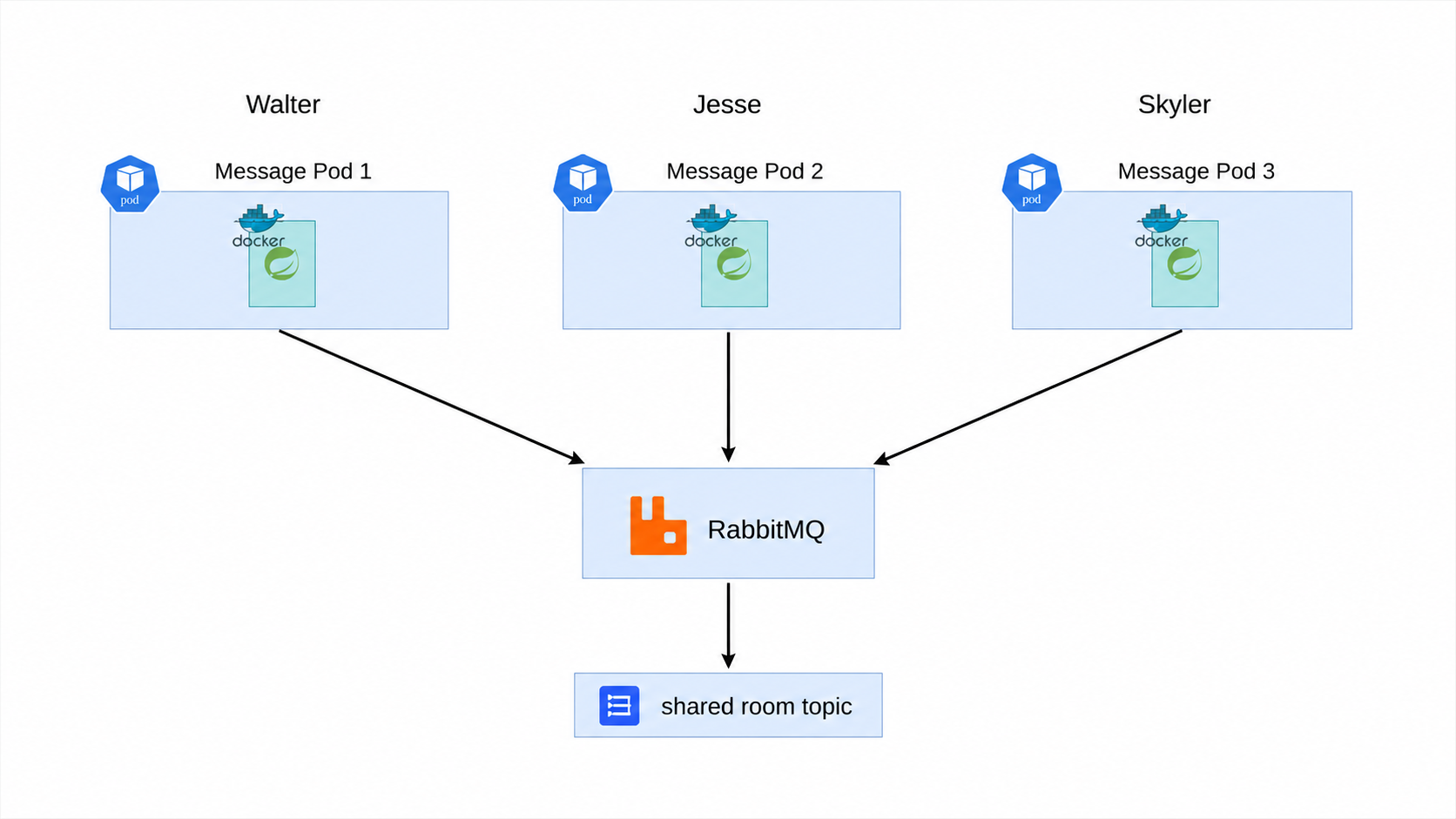
The WebSocket connection still belongs to the instance that accepted it. The local session manager keeps the user information for that connection. This works because a WebSocket is a persistent connection. A load balancer can spread new connections between instances, while RabbitMQ connects the instances at the message level.
The room state is also outside the Message Service instances. It is stored in Redis through the Room Service. Because the important shared state is not kept inside one Message Service instance, the instances can be added or removed without creating separate chat worlds.
This is the real reason the application can scale horizontally. Kubernetes can run more Message Service pods, the load balancer can spread new WebSocket connections between them, and RabbitMQ can deliver each room event across all of them.
The Message Service does not need to know which pod owns each subscriber. It only publishes to a topic such as /topic/roomId. RabbitMQ knows the active subscriptions and sends the event to the correct connections through their pods.
This keeps the Message Service almost stateless at the application level. A pod only owns its active network connections and their small local session objects. Room membership is shared in Redis, and message delivery is shared through RabbitMQ.
Internal message flow
WebSocketConfig creates the STOMP endpoint and connects Spring to the RabbitMQ broker relay. It uses /messages for messages entering the application and /topic for messages delivered to room subscribers.
This configuration is the main connection between Spring WebSocket and RabbitMQ:
@Override
public void configureMessageBroker(MessageBrokerRegistry registry) {
    registry.setApplicationDestinationPrefixes("/messages")
            .enableStompBrokerRelay("/topic")
            .setRelayHost(rabbitHost)
            .setSystemLogin(rabbitUser)
            .setSystemPasscode(rabbitPassword)
            .setClientLogin(rabbitUser)
            .setClientPasscode(rabbitPassword);
}
Three channel interceptors control the connection.
- AuthorizationInterceptor checks
SENDframes and blocks messages from guest sessions. - SubscriptionInterceptor checks
SUBSCRIBEframes, registers the session, and publishes aJOINevent for authenticated members. - UnsubscribingInterceptor handles
UNSUBSCRIBEframes, removes the member session, and publishes aLEAVEevent.
For example, the authorization interceptor rejects invalid destinations and guest messages before they reach the controller:
if (StompCommand.SEND.equals(accessor.getCommand())) {
    if (!accessor.getDestination().startsWith("/messages/")) {
        return null;
    }

    if (!webSocketSessionManager.isAuthenticated(accessor)) {
        return null;
    }
}

return message;
SimpWebSocketSessionManager stores the user details that belong to the local connection. For an authenticated subscriber, it validates the JWT and calls ExternalRoomService to create a member record. For a guest, it creates a limited local session that can receive messages but cannot send them.
MessageMappingController receives messages sent to /messages/{roomId}. It reads the sender from the session manager and creates a STANDARD room event. RoomMessagePublisher then sends the event to RabbitMQ through Spring’s messaging template.
WebSocketListener handles unexpected disconnections. If a browser closes without sending an unsubscribe frame, the listener removes the session from the Room Service and publishes a LEAVE event.
The room addresses follow this format:
/topic/{roomId}
An authenticated member sends a message to this address:
/messages/{roomId}
The service supports three event types.
STANDARDis a normal chat message.JOINtells the room that a member joined.LEAVEtells the room that a member left.
When a client subscribes, the service checks the JWT token. A user with a valid token becomes a room member and can send and receive messages. A user without a valid token becomes a guest. A guest can read messages but cannot send them.
One WebSocket session can subscribe to one room.
When a member closes the connection, the service removes that session from the Room Service. It also sends a LEAVE event to the room. This works even when the user closes the browser without leaving the room normally.
RabbitMQ carries the room messages. It allows messages to reach users even when they are connected to different Message Service instances.